
providers
Applying to become an official provider
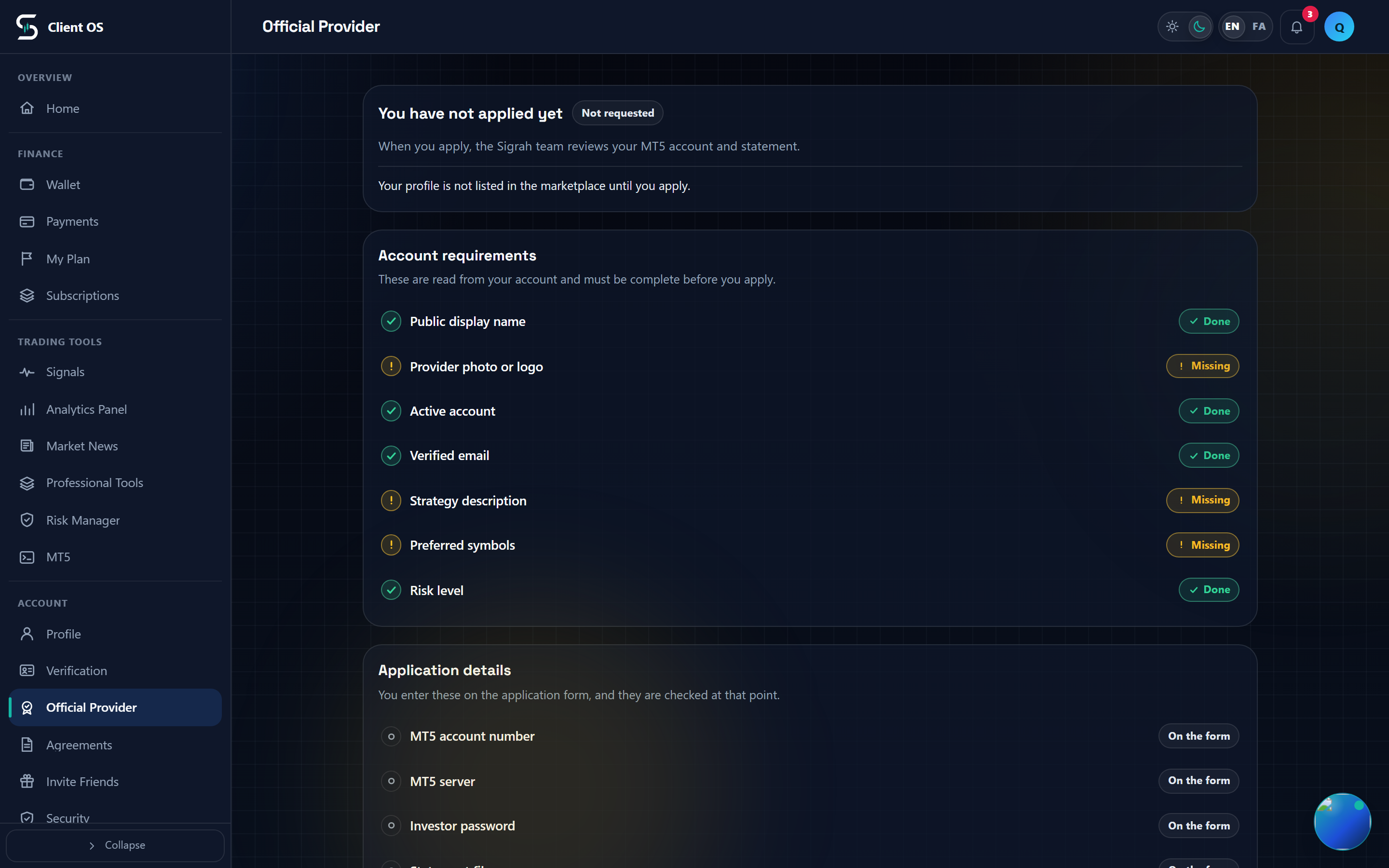
A provider account applies for official marketplace standing on the Official Provider page: seven Account requirements must all read Done, then the form collects the MT5 account details, the Investor password and a statement file. An admin then approves, rejects or suspends the application.
Official Provider is where a provider account applies for official marketplace standing. The work splits in two: Account requirements are read from your profile and the apply button does not appear until every one of them is Done, and the application form collects your MT5 access details and a statement file. An admin then approves, rejects or suspends what you send.
Open the page in the panel
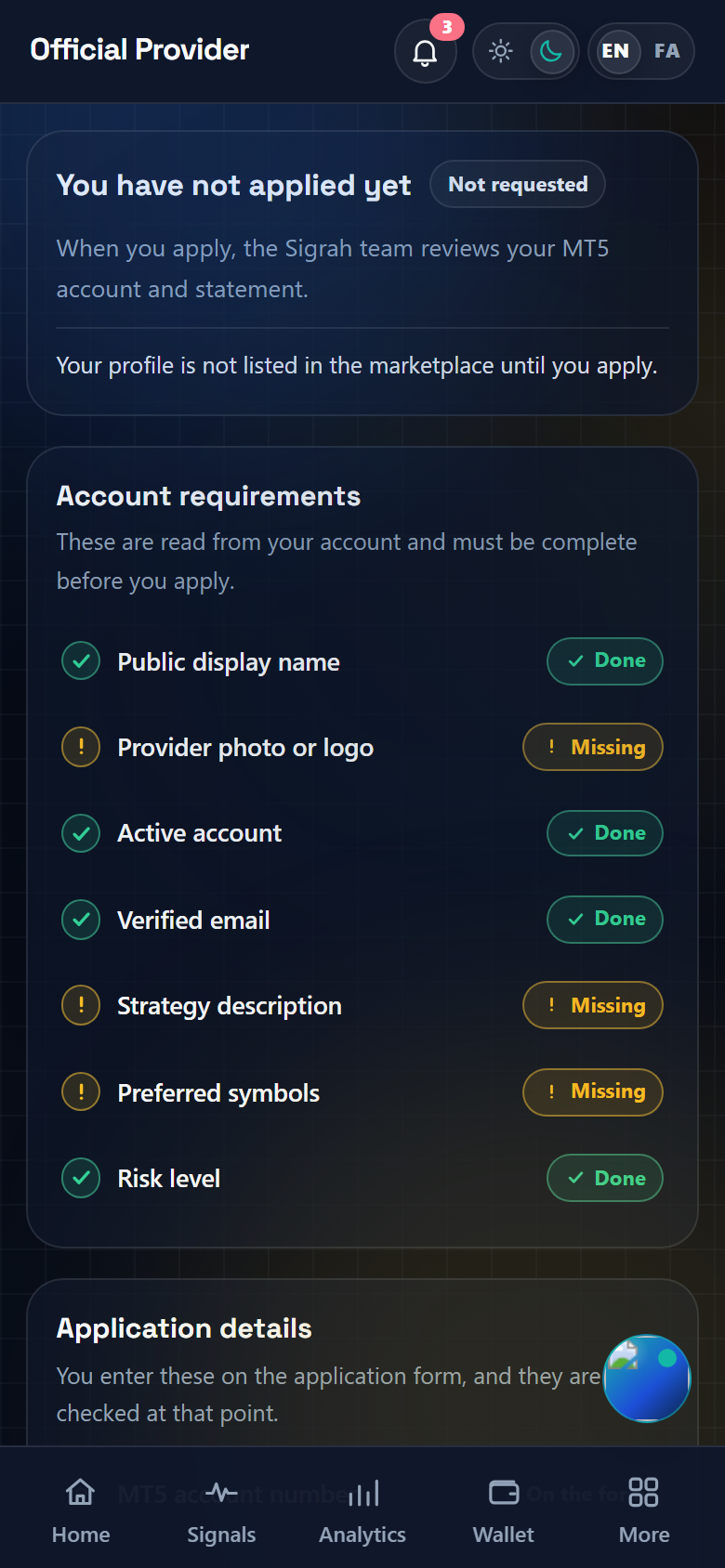
In the panel sidebar open Account → Official Provider, or go straight to /provider-verification. The page only works for an account whose role is provider; the role is chosen at registration and cannot be changed from inside the panel. Any other account sees "This area is for providers." with a Back to the panel link, and the server refuses its requests as well. The card at the top of the page tells you where you stand: Not requested, Pending review, Approved, Rejected or Suspended.
Clear the Account requirements
Seven rows in this section are read from your account and provider profile, each marked Done or Missing. Until all seven say Done, the apply button is replaced by a Complete account requirements notice listing what is missing. Only the Verified email row carries a fix-it link, to /verification; the rest have no link. Five of them, Public display name, Provider photo or logo, Strategy description, Preferred symbols and Risk level, you can set either in Profile → Edit profile or further down on the application form, which carries the same fields. Active account is the status of the account itself.
- Public display name: at least 3 characters
- Provider photo or logo
- Active account: the account status must be active
- Verified email
- Strategy description: at least 20 characters
- Preferred symbols: at least one
- Risk level: Low, Medium or High
Open the form and fill the Application details
The Application details section has exactly four rows: MT5 account number, MT5 server, Investor password and Statement file. Each is marked On the form until you fill it in. Apply as an official provider (or Submit a corrected application, after a rejection) opens the form below, and Cancel closes it again without sending anything. The hint under Investor password states what it is: the read-only account password, which cannot place trades. The field is masked, never autofilled and is cleared the moment the request is sent; the server stores it encrypted and no screen, the admin's included, ever shows it back.
The rest of the form: name, strategy and two files
Alongside those four, the form carries Public display name, Strategy description, Preferred symbols (separated by commas, stored uppercased), Risk level and the Provider photo or logo upload. Provider photo or logo is public and appears in the marketplace (it is not your account profile photo) and takes JPG, PNG or WEBP up to 5 MB. Statement file stays private and is seen only by the review team: PDF, CSV, XLS, XLSX, HTML, ZIP, JPG, PNG or WEBP up to 20 MB. Use Choose a file, and Replace file to swap one; each shows Ready to send once picked, and nothing is uploaded until you submit.
Submit the application
Press Submit application. While anything is missing the button stays disabled with Complete what is missing before sending underneath. On success the page confirms that your application was submitted, the form closes, and the standing card moves to Pending review.
Where to check the result
The same page then shows Last submitted application: the Submitted date, the MT5 number and server, risk level, symbols and Statement recorded. The file itself is never linked back to you. Older attempts stay under Earlier applications, and no review deadline is promised anywhere. If the answer is a rejection, a Review note card carries the reviewer's reason and you can send a corrected application once you have fixed it. Approval gives your profile the official mark, lists it in the marketplace and marks your MT5 accounts as admin-verified.